A quick read beforehand to understand the difference between Altair SLC from Altair and RapidMiner SLC from Siemens: Is it Possible to Program in SAS Without Using a SAS Institute Solution?
Which License Is Free, and Who Is It Intended For?
The Altair SLC Personal Edition can be used by everyone! It offers standard features suitable for business use, personal projects, academic research, nonprofit organizations, or anyone interested in exploring product performance using our robust software.
Source: Altair Website, 2026
How long is this free license valid?
Upon installation, the personal edition license is valid for 1 year and is renewed with every generally available software release.
Source: Altair Website, 2026
What Software Should Be Installed?
To program in SAS using Siemens products, two components are required:
- Altair SLC/Rapidminer SLC as Engine
- Altair Workbench (/Rapidminer Workbench?) as Programming interface
Changing the Default Encoding Value
By default, the global option is encoding=WLATIN1.
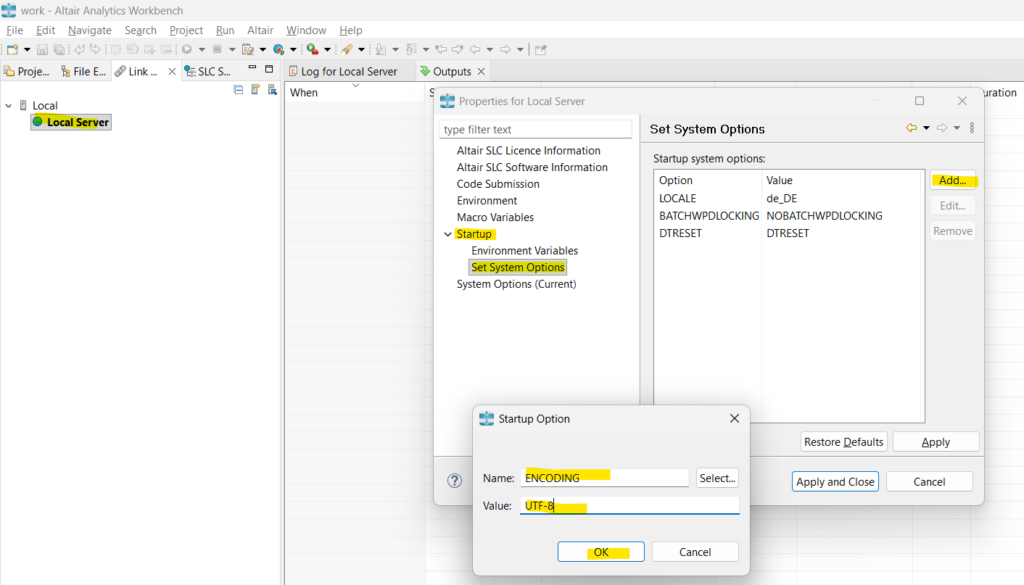
To permanently change it to encoding=UTF-8, follow these steps in the RapidMiner Workbench interface:
- Open either the Link Explorer window or the SLC Servers window.
- Right-click on Local Server and select Properties to open a new window.
- In the Startup menu, select Set System Options.
- Click the Add… button.
- Enter a value in each of the two fields and click OK to confirm.
- Name: ENCODING
- Value: UTF-8
- You will then be prompted to restart the software for the changes to take effect.
See Also
- Rapidminer Series (1/5): Is it Possible to Program in SAS Without Using a SAS Institute Solution?
- Rapidminer Series (2/5): Is it Possible to Install Rapidminer SLC for Free to Program in SAS?
- Rapidminer Series (3/5): Renewing the Altair SLC (Community Edition) License
- RapidMiner Series (4/5): Resources for Getting Started with RapidMiner Analytics Workbench (Guide to Download)
- Rapidminer Series (5/5): 6 Things to Know Before Migrating Your SAS Programs to Rapidminer Solution
Leave a Reply